I have always loved a diverse vocabulary, from vividly descriptive scenes in books and eloquent deliveries of motions within a debate to the more malicious usage of language through argumentative obscurantism and the appeal-to-authority fallacy. The irony of being both dyslexic and a painfully slow reader of complex literature, while also having a love of vocabulary, is not lost on me. With age, I have noticed a slump in the expansion of my diction, so my learning methods are clearly not working!
Having always wanted to try building an app, I thought focusing on expanding my vocabulary would be a nice well contained project to start with. I somewhat pretentiously defined these more advanced words as ‘D1’ level, borrowing from the European language proficiency levels (A1–C2) – i.e. beyond native speaker level, or to use the Japanese martial arts/sporting grading system, First Dan level.
So, let’s get into it. I began with a rough idea of what I wanted, with a self-contained Progressive Web App being the most reasonable implementation. This helps avoid using app development languages and the dreaded app stores, with the added bonus that I could develop for Apple and Android simultaneously.
To actually develop the thing, I began construction utilising AntiGravity in agentic mode (I am a Python guy…you didn’t think I was going to learn JavaScript for this, did you?). Skipping over a lot of the waffle during the development process, I will talk through the app and a few of the neat features (at least, as they currently stand).
The app’s features
I began with learning pannel to make assist in the learning of these words:
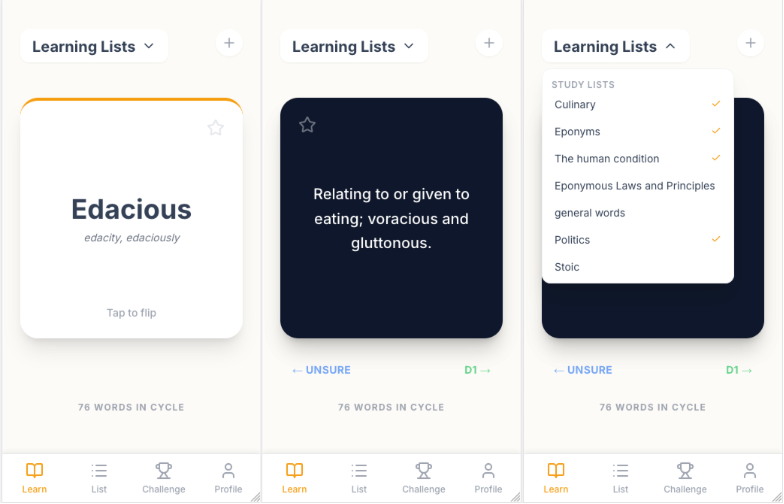
This gives a pool of words from lists that have been selected for learning, presented in a flashcard style. Alternative linguistic forms of the word are also shown when relevant, and the card can be flipped by tapping to reveal the definition. I went for a ‘Tinder’ style swiping interface where, if you know the word, you can right swipe to remove it from the pool and left swipe to keep it in the pool, but go to another word. You can toggle the word lists in this panel with the dropdown.
We add a word list panel:
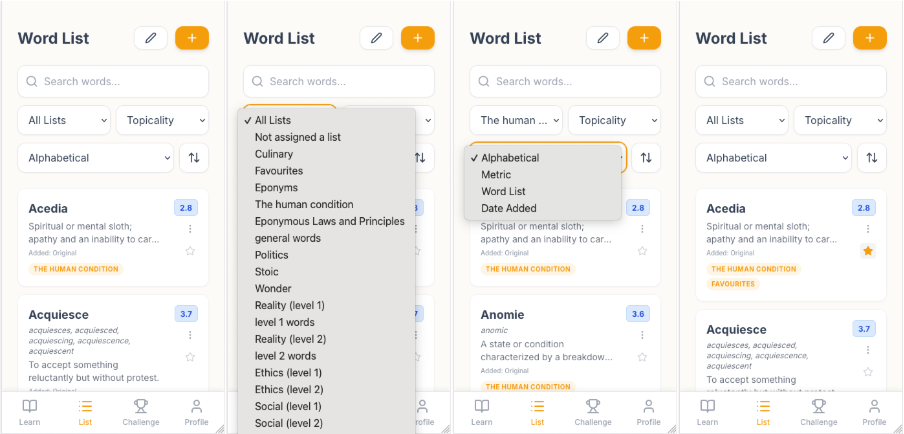
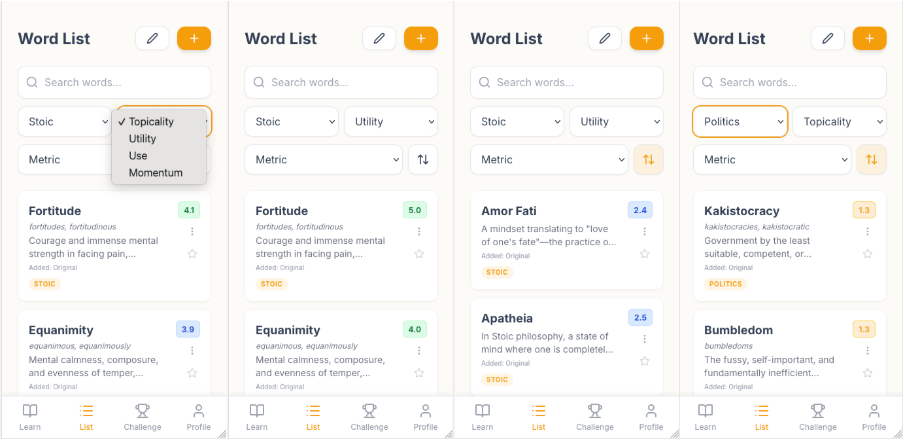
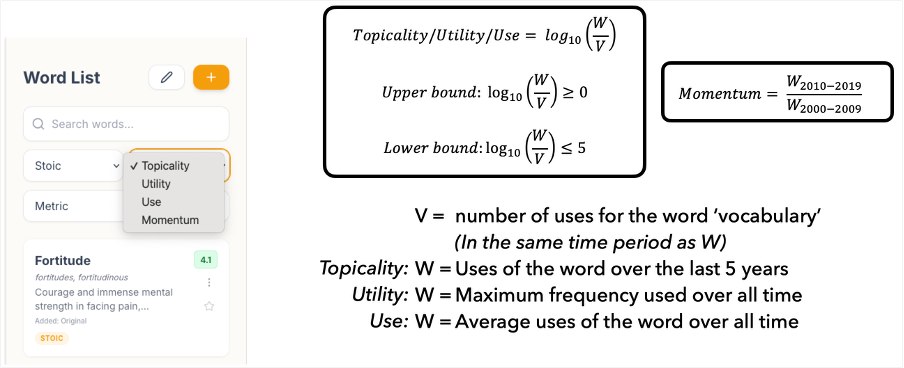
This lets you manage new and existing words across different lists. We can filter by list, sort by various word metrics (we will come back to these), and add words as favourites here – automatically adding them to the favourites list.
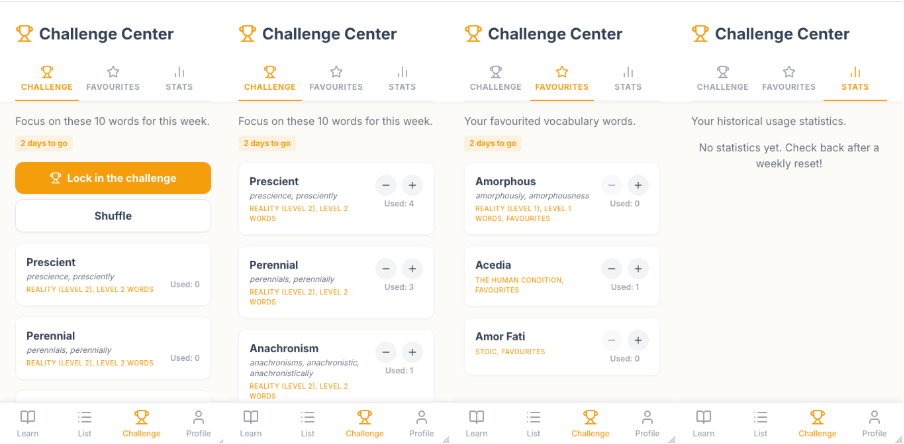
I then made a challenge section to gamify the use of words each week. Word lists are selected (like in the learning section), a random ten words are then chosen (with less frequently used words weighted more heavily during the initial selection) and, once you are happy with them, you can lock in the challenge. You can no longer change the words, but now you can record their usage over the rest of the week. There is also a favourites tab for curating words whose usage you can always record.
Finally, I added a stats tab for tracking long-term statistics.
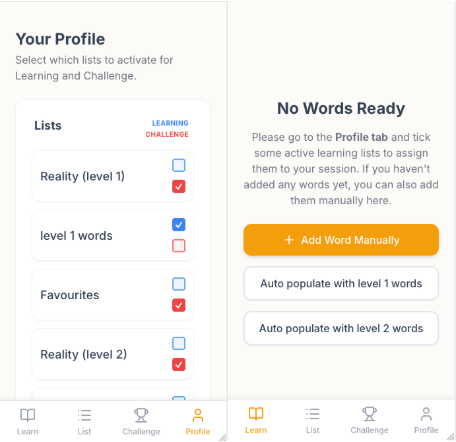
I also added a profile section for controlling which words go into the learning and challenge tabs. There is also an updating words-list function that appears when I push more word lists – I have already provided quite a few words. Finally, if no word lists are selected, I provide two difficulty levels of reasonable/desirable starting words to get started with.
Technical features
Metrics
To give some indication as to how useful any word or phrase is, I include four metrics. These are only present for words I add to the app – not user added words. When a word is used, we trigger a request to the Google Ngrams API to see the usage of said word over various periods of time. We construct the metrics ‘topicality’, ‘use’ and ‘utility’ by taking the use of these words over various periods of time, normalising against the word ‘vocabulary’ over that same time period, scaling with a logarithm and then capping the values between 0-5. Momentum is simply the ratio of the word's usage from 2010-2019 to 2000-2009, with a positive number indicating a more relevant word.
Dictionary
I then added a dictionary function for checking word definitions. I used a GCIDE Dictionary Integration - a fairly comprehensive dictionary - that provides built definitions for the user to add new words with ease. There were a few trade-offs to consider with using an offline dictionary, so it is not always the most comprehensive, but is fast, simple, free to use and working.
And that's it (for now). I hope you can enjoy it!